Your revenue, hours, and projects in one view

See monthly revenue, hours worked, active projects, and trends in one freelance dashboard, without switching tools.

  • Revenue, hours & projects at a glance
  • Month-over-month trends
  • Quick-log time from one screen
Start free See pricing

Free plan, no credit card required.

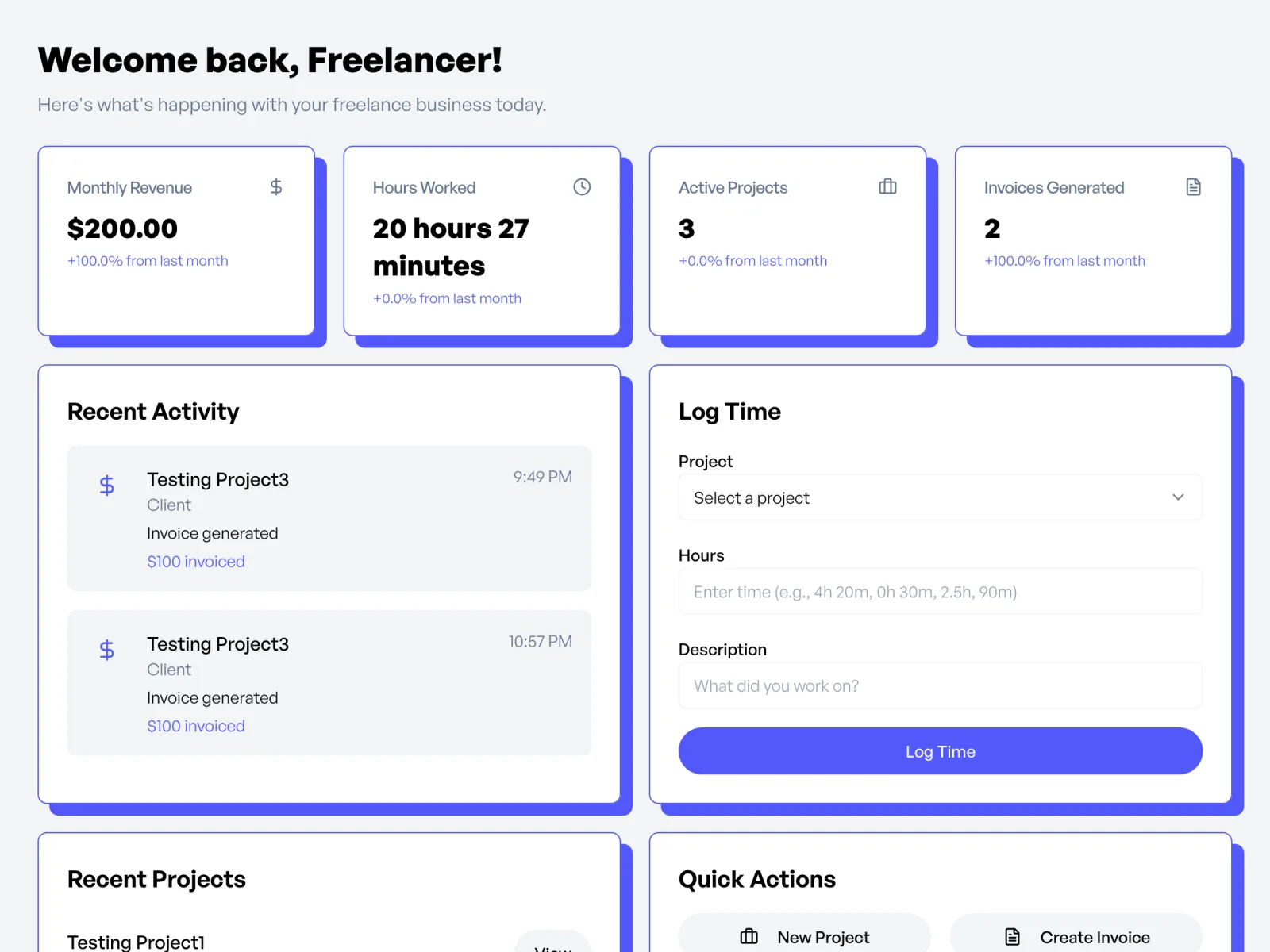
Freelance dashboard showing revenue, hours, and active projects in Workey

Dashboard / Work & projects

Start free

See how your business is doing

  • See it all

    The Workey freelance dashboard answers it in one screen: monthly revenue, hours worked, active projects, and invoices generated, each with a trend vs last month.

  • Quick-log time

    Log billable hours directly from the dashboard without opening the timer or timesheet. Recent activity keeps what you logged visible.

  • Always in sync

    Your command center stays in sync with every project, time entry, and invoice you create elsewhere in Workey.

The numbers on your dashboard

Every metric carries a trend comparison to last month, so you know if you're on track without opening spreadsheets.

Monthly revenue

What you earned this month, with the trend vs last month.

Hours worked

Logged billable time across every project.

Active projects

Work in flight right now.

Invoices generated

How much of your work has been billed.

Quick-log time from home

Log billable hours directly from the dashboard without opening the Timer or Timesheet. Handy right after a client call when you want hours captured before you forget.

Recent activity feed

See what changed recently (logged time, new invoices, project updates) so your freelance business stays visible on one screen. Pair with Work Activity for a longer view of your work rhythm.

Your freelance business in one connected flow

  1. Projects
  2. Time entries
  3. Invoices

The dashboard summarizes what you log in Projects, the Timer, and Invoices. Open any of those features to drill in, then return home to see updated revenue and hours.

Questions about dashboard

What should a freelance dashboard show?

A useful freelance dashboard shows revenue, hours worked, active projects, and recent activity in one view, with trends so you can tell if you're on track compared to last month. Workey's dashboard is built around those metrics.

Can I see month-over-month trends on the dashboard?

Yes. Key metrics on the Workey dashboard include trend comparisons to the previous month, so you can quickly see whether revenue and hours are up, down, or steady.

Does the dashboard update in real time as I log hours?

The dashboard pulls directly from your time entries, invoices, and projects, so when you log new hours or generate invoices the numbers update almost immediately.

Is the dashboard only for one client or for all my work?

The dashboard aggregates all of your freelance work across every client and project so you can see your full picture in one view, then drill into specific projects when needed.

Can I log time without leaving the dashboard?

Yes. Quick-log time from the dashboard without opening the timer or timesheet, handy when you want to capture hours right after a client call or sprint.

Try Dashboard on your own work

Use it alongside the rest of Workey on a free account.

Start free